An App-Only Discount is a Shopify discount that can be used only by customers inside your mobile app.
It will not work on your website or any other platform.
Use App-Only Discounts to:
Offer exclusive deals to mobile app customers
Encourage app installs and usage
Discounts can be applied in two ways:
The discount is applied automatically when the customer meets the conditions.
Customers do not need to enter a code.
Commonly used for site-wide or campaign-based promotions.
Example:
10% off orders over $100 - applied automatically at checkout.
The customer must enter a discount code manually.
Manual mode is supported only for App-Only Discounts.
The discount will not apply unless the correct code is entered.
Cart page: Customer enters the Suffix of the discount code.
Example: Discount code APP-SAVE10 → Enter SAVE 10
Checkout page: Customer enters the full discount code (prefix + suffix).
Example: Enter APP-SAVE10
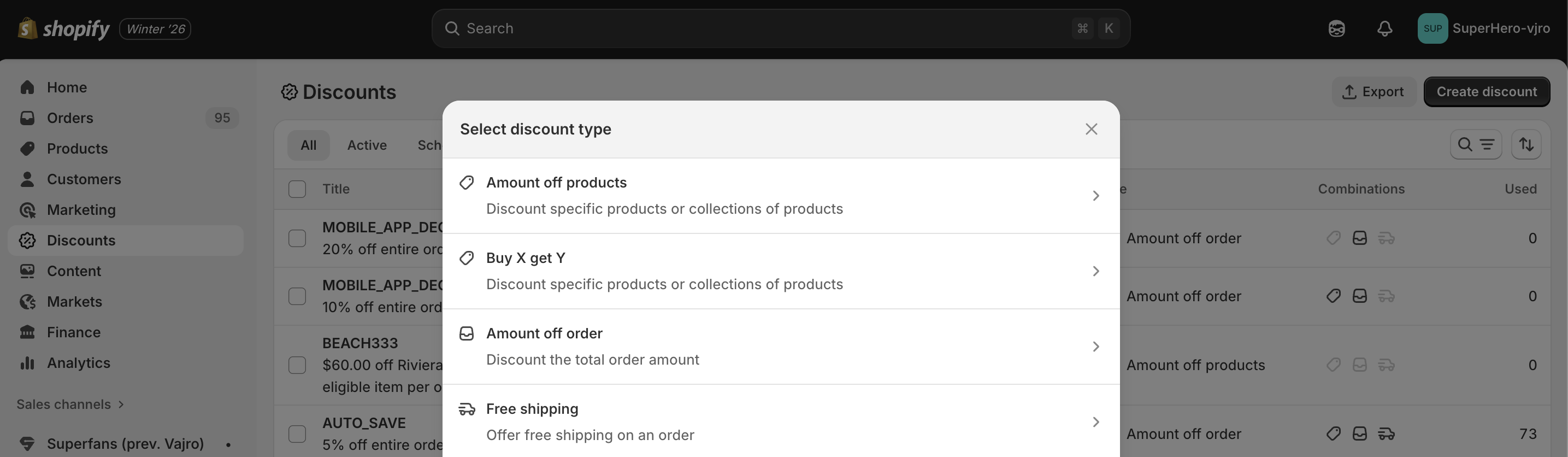
We support Shopify discounts and apply them seamlessly within the app experience.
Amount off products - The discount reduces the price of specific items in the cart.
Example: A customer buys a T-shirt priced at $30. You set a $5 App-Only Discount on T-shirts. In the app, the T-shirt now costs $25.
Amount off order - The discount reduces the total order amount.
Example: A customer’s cart totals $100. You set a $10 App-Only Discount for orders. In the app, the total automatically becomes $90.
3. Buy X Get Y- The discount gives customers a free or discounted item when they purchase a required quantity.
Example: A customer buys 2 T-shirts priced at $30 each. You set a Buy 2 Get 1 Free App-Only Discount. In the app, the customer pays $60 and receives 3 T-shirts.
Example (discounted item): Buy 1 pair of shoes and get 50% off socks. If the socks cost $10, the customer pays $5 for them in the app.
Free Shipping - The discount removes the shipping cost from the order.
Example: A customer’s order total is $80, and shipping costs $10. You set a Free Shipping App-Only Discount. In the app, the customer pays $80 instead of $90.