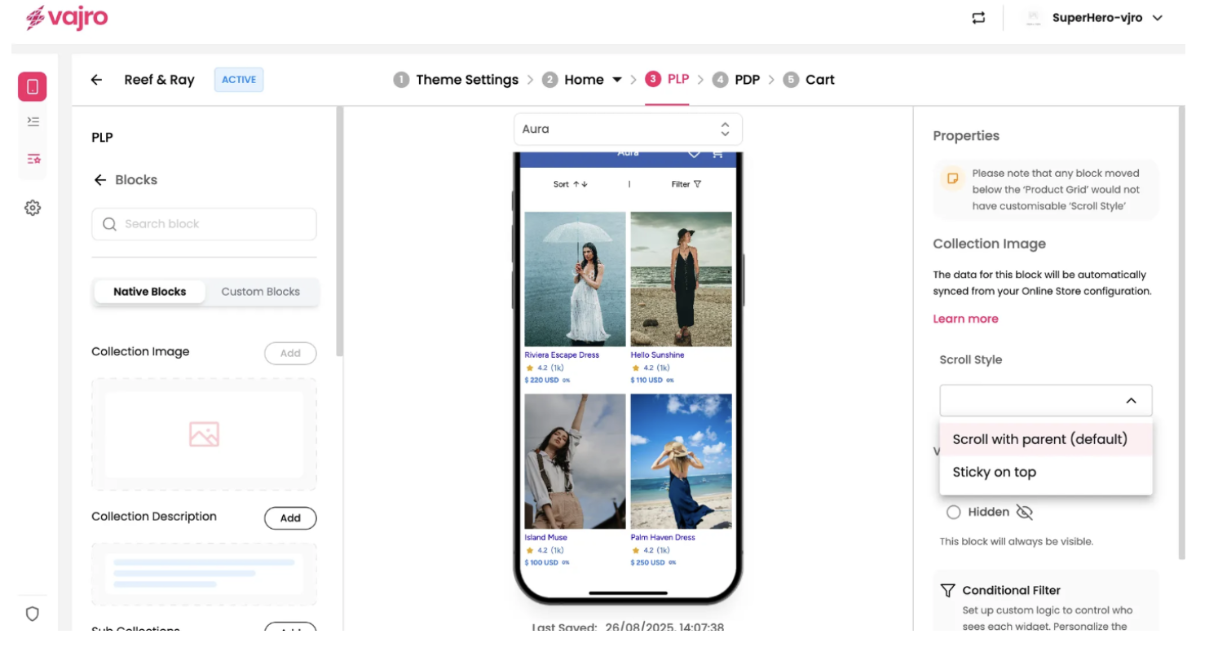
A Product Listing Page (PLP) is a key component of your mobile app that displays a group of products from a single category or collection. It serves as a digital storefront for your product catalog, helping customers browse and discover products efficiently. The PLP is a crucial step in the user journey, bridging the gap between a broad category view and the specific product details on a PDP.
Collection Image
Enhance your Product Listing Pages (PLPs) by showcasing a visually appealing Collection Image. This block allows you to feature a header image relevant to the product collection, providing a rich visual context for your customers as they browse.
Features & Controls
Customize your Collection Image using the controls on the right panel.
Properties Panel
This section is where you manage the data and scrolling behavior for your Collection Image.
Collection Image: This area typically displays a placeholder or the currently uploaded image. The data for this block is automatically synced from your Online Store configuration, meaning the image you've set for your collection in Shopify (or similar e-commerce platform) will be displayed here.
Note: The text in your screenshot indicates that the "data for this block will be automatically synced from your Online Store configuration," suggesting direct image upload might not be an option within this specific block, but rather managed through your e-commerce platform.
Scroll Style: This setting controls how the Collection Image behaves when a user scrolls through the PLP.
Scroll with parent (default): This is the standard behavior. As the user scrolls down the PLP, the Collection Image will scroll upwards and eventually off-screen, moving with the rest of the page content.
Sticky on top: When this option is selected, the Collection Image will remain fixed at the top of the screen once its original position reaches the viewport's top edge. It will stay visible even as other product content scrolls underneath it. This is useful for keeping important branding or visual context persistently in view.